
Any USB or built-in webcam at the packing desk. Plug it in, pick it in the app, scan a parcel. This is how most single-station sellers start.
Video Management System
Video Management System for Ecommerce Warehouses
TrackVid's video management system for ecommerce records every packing and return on a barcode scan or a typed Order ID, with one Record and Stop button at the station. Each HD video, parcel photo and label photo is linked to the Order ID and AWB at capture and stored in AWS S3. Live in under 15 minutes.
Officially authorised VMS partner of Snapdeal.
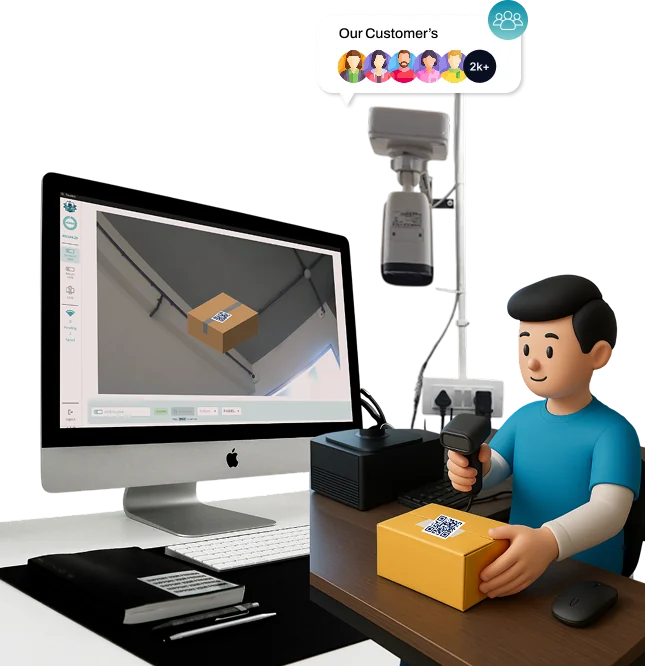
It works with any IP camera, Wi-Fi camera or webcam, including the CCTV already above your packing tables. No new hardware and no OMS to connect first.
- Sellers on the platform
- 1,100+
- Platforms with claim filing live
- 9
- Go-live time
- Under 15 min
- Retention bands
- 30, 60 or 90 days
The short definition
What is a video management system for ecommerce?
A video management system for ecommerce is not CCTV with a bigger hard disk. CCTV records a room against a clock, so when a marketplace asks what was inside one parcel you are scrubbing through hours of footage.
A VMS for ecommerce records by order instead. One parcel, one recording, tied to the Order ID and the AWB at the moment of capture, and searchable by either for as long as you keep it. That is the difference between footage and proof.
For an ecommerce VMS in India the requirement is written into the claim programmes. Flipkart SPF, Myntra PPMP and AJIO all expect order-level packing video before a claim is treated as eligible, which our guide to marketplace packing video requirements sets out platform by platform. Without it, an empty-box or wrong-item claim is your word against the customer's.
TrackVid is packing video software built for that single job. The wider TrackVid feature list shows what sits around it.
Hardware
Which cameras work with TrackVid?
Every network camera: IP cameras, Wi-Fi cameras, the CCTV already above your tables, DVR channels and ONVIF devices. ONVIF credentials and network discovery are built in, so a camera already on your network is found rather than re-cabled.
The TrackVid Android app on Google Play records packing and return videos handheld, linked to the order just as a station camera is. Useful for bulky parcels, a receiving bench with no fixed camera, or a second site you have not wired up yet.
No new hardware. If a camera shows the printed label clearly in frame, it is good enough to start today.
If you are buying from scratch, any 1080p camera at 15 to 30 frames per second is enough. Placement decides claim outcomes far more than the brand does: mount it above the station so the open parcel and the label are both in frame, and keep the lighting steady so the AWB stays readable. Our Flipkart VMS camera guide compares setups by budget.
More than one station, more than one site. Each camera is a feed, a feed belongs to a packing desk, and every recording carries its feed. Twelve desks across three cities sit in one dashboard, and you can filter straight to the desk that packed the disputed order.
At the packing table
How does recording start, and when does it stop?
Four paths start or stop a recording. None of them asks the packer to remember anything.
-
1
Scan
The packer scans the shipping label barcode, or types the Order ID or AWB and presses Enter. Recording starts on that commit.
Scanning the next order stops the previous recording and starts the next.
-
2
Record and Stop
One control does both jobs: a play triangle while the station is idle, a filled square while it is recording.
It is there for the parcel whose label will not scan.
-
3
Return re-scan
Scanning the same return AWB again stops the recording and opens the condition prompt, which is where return inspection begins.
Returns are recorded as Return Video, forward packs as Forward Video.
-
4
Long video countdown
There is no maximum duration. A warning appears at five minutes and recording stops a minute later unless the packer chooses to continue.
A long pack is captured in full, while a camera left running does not fill your storage.
Recorded without audio
Video is captured without sound. No marketplace claim programme asks for audio, and what settles a dispute is what the camera shows: the product, the label, the seal and the time.
The record
What does every recording contain?
- Video
- The HD packing or return video, without audio, with its length stored alongside it.
- Screenshots
- Stills of the parcel and the printed label, attached to the same order.
- Order identity
- The scanned tracking ID, plus the Order ID and AWB filled in from your uploaded order data when the scanned ID matches a row.
- Time
- Capture start time, and the delete-on date set by your retention band.
- Desk and person
- The feed, which is the packing desk or camera, and the user signed in at the station.
- Type
- Forward Video or Return Video, and for a return the Good or Bad condition logged.
What is not stored, said plainly
No SKU is held on the video record. SKU data is read for a return quantity check at the station and then discarded, so you cannot search a video by SKU. Search is a prefix match on tracking ID, Order ID and AWB, with date, platform, feed and forward or return as filters beside it.
Shipping over 100 orders a day? See your own packing station recorded live in a 15-minute demo.
Book a free 15-minute demo
Storage and retention
Where are packing videos stored, and for how long?
Every file is uploaded to Amazon S3 over HTTPS. The packing computer is never the record of truth, so a failed desktop does not cost you a month of evidence.
Retention is 30, 60 or 90 days, chosen in your dashboard, and 60 days is the default. Other periods are available on request. Choose the band against your claim windows, because a video that is gone before the window closes was never evidence.
Deletion is enforced, not promised. Each recording stores a delete-on date at capture, the capture time plus your retention band, and a scheduled job removes the file once that date passes. A video you mark as a favourite is held back until you un-mark it, which is how sellers keep the ones attached to an open dispute.
Through the whole period the video stays hot: open the order, press play, and it streams. Access is limited to your own users and roles, and videos are your data, never shared with other sellers or third parties. The security page states what is in place, and pricing publishes how credits per video move with retention band and file size, with no hidden charges.
Independence
Do I need an OMS to use TrackVid?
TrackVid works without an OMS. Most sellers do not need one to record, store or file claims: orders are identified at the packing station from the barcode or the typed Order ID, and every video is linked to the Order ID and AWB at capture. Nothing has to be integrated before the first recording.
Sellers who run an OMS can sync orders from it, with BaseLinker live today, but no part of recording, storage or claim filing depends on one. The integrations page lists what is live and what is planned.
In practice the first recording happens on the day of the call. Setup is remote and takes under 15 minutes: connect the camera, create the feed, scan a parcel.
What the video pays for
What happens after the video exists?
Claims filed for you
TrackVid spots a claimable event, attaches the matched video and photos, and files on your own seller portal access using robotic process automation, inside the window and against the correct reason code. Claim automation is live on nine platforms: AJIO, Myntra, Snapdeal, Meesho, Flipkart, Nykaa Fashion, Tata CLiQ, Delhivery and Xpressbees. Amazon filing against SAFE-T is in build, so Amazon is video and order data today.
AJIO footage emails answered
A CCTV FOOTAGE REQUIRED email from AJIO is detected in your connected mailbox and answered with the order-linked packing video, in batches of ten. AJIO automation also raises AJIO NDR and delivery dispute claims, an AJIO process only.
Returns inspected
A return scanned at the desk is recorded and logged Good or Bad, and ticket management carries bulk Excel uploads, many seller accounts in one login and the ticket status refresh.
Shared with the customer
The packing video can be sent to the buyer on WhatsApp as soon as the order is packed, through Mark360 or 11za, which D2C automation covers.
Fit
Who needs a video management system for ecommerce?
- 01 Apparel, footwear and accessories sellers, where wrong-item returns are routine
- 02 Sellers listing on three or more marketplaces at once
- 03 Warehouses shipping over 100 orders a day
- 04 Brands packing from more than one location
The common thread is a claim already lost for want of footage. Sellers using TrackVid report an 85 to 90% win rate on video-backed disputes (TrackVid data), and results vary with marketplace mix and how completely orders are recorded.
Questions
Frequently asked questions about a video management system for ecommerce
What is a video management system for ecommerce?
A video management system for ecommerce records each parcel while it is packed, links the recording to the Order ID and AWB, and keeps it searchable for the claim window. CCTV records by time and proves nothing specific. A VMS records by order, which is the format marketplaces accept.
Does TrackVid work with the CCTV cameras I already have?
Yes. TrackVid supports webcams and RTSP cameras, and RTSP covers the IP, CCTV, DVR and ONVIF cameras already in your warehouse. The Android app records handheld where there is no fixed camera. No new hardware is needed.
Which camera should I buy for a packing station?
Any 1080p camera at 15 to 30 frames per second is enough. Placement matters more than brand: mount it above the packing station with the label readable in frame and steady lighting. TrackVid's camera guide covers setups by budget.
Does recording start automatically?
Yes. A barcode or AWB scan starts the recording, and scanning the next order stops the previous one and starts the next. A Record and Stop button is there when an operator needs it, so nothing depends on the packer remembering.
Is there a limit on how long a packing video can be?
There is no maximum duration. A warning appears at five minutes and the recording stops a minute later unless the packer chooses to continue, so long packs are captured in full without runaway files.
Does TrackVid record audio?
No. TrackVid records video without audio. No marketplace claim programme asks for audio, and the evidence that decides a claim is what the video shows: product, label, seal and timestamp linked to the order.
Do I need an OMS to use TrackVid?
No. Orders are identified at the packing station from the barcode or the typed Order ID, and every video is linked at capture. Most sellers never connect one. If you run an OMS, TrackVid can sync orders from BaseLinker.
How long are videos kept?
You choose 30, 60 or 90 days of retention, and 60 days is the default. Every video stays available for the whole period and is deleted automatically when it ends. Videos you mark as favourites are kept until you un-mark them.
VMS for ecommerce kya hota hai?
VMS for ecommerce ek system hai jo har parcel ki packing video record karta hai aur usko Order ID aur AWB se link kar deta hai. Claim ke time par video seconds me milti hai. Flipkart, Myntra aur AJIO claims ke liye aisa order-linked video zaroori hai.
TrackVid VMS setup me kitna time lagta hai?
15 minute se kam. TrackVid team remotely aapka camera connect karti hai, packing station set hota hai, aur pehli recording usi din shuru ho jaati hai. Naya hardware nahi chahiye aur OMS bhi zaroori nahi hai.
What this page claims, and what it does not
Figures. Seller counts and win rates are TrackVid data. Your own outcome varies with marketplace mix, return profile and recording completeness.
Recording. The packing recorder is a desktop application for Windows and macOS, and video is captured without audio.
Marketplace rules. Claim programmes and evidence rules are set by the marketplaces and change without notice. Confirm current policy in your seller panel.
Last updated: 17 October 2026
See Your Own Packing Table on Camera
In one session you will see a parcel recorded, linked to its Order ID and AWB, found again by AWB and attached to a claim. Bring one disputed order.
Book a free 15-minute demo1,100+ sellers. Officially authorised VMS partner of Snapdeal. Live in under 15 minutes.