
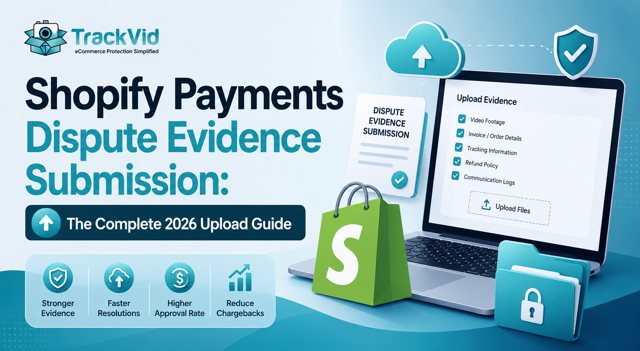
For Shopify Payments merchants. Updated June 2026.
Shopify Payments dispute evidence submission is a skill most merchants have never been trained on. Per Chargeflow 2026, merchants uploading evidence manually win under 20 percent of the time. Merchants uploading the correct 5-file structure win 70-85 percent. The gap is not evidence quality alone: it is knowing what file formats to use, which files to upload in which order, how to structure the cover statement, and how to work within the 7-10 day response window.
If a dispute just landed in your Shopify admin and you have 24-48 hours to submit, this is the tactical guide. File format specifications, upload sequence, cover statement structure, deadline management, and common submission mistakes that cause automatic losses regardless of evidence quality.
Manual submission errors cost Shopify Payments merchants an average of $195.20 per lost dispute per Beast Insights 2026. Combined with the Shopify 1 percent chargeback ratio threshold, Visa AMP at 1.5 percent (April 2026), and Mastercard Scam Monitoring at 5 percent combined rate (July 24, 2026), every submission error adds to compliance risk.
Card banks decide disputes on documents, not on stories.
San Diego Outdoor D2C Merchant Alex: 24% Win Rate to 79% by Fixing Submission Alone
Alex runs a Shopify D2C outdoor lifestyle brand from San Diego. Camping gear, hiking equipment, and outdoor apparel. Daily volume approximately 210 orders. Average order value $134. Monthly GMV roughly $840,000.
His dispute problem in early 2026 was not evidence gaps. He had video, tracking, and communication logs. His problem was submission process. He was winning 24 percent of disputes despite having the underlying evidence.
His audit revealed five tactical errors his team was making:
Error 1: Videos uploaded as MOV files exceeding 100MB, causing truncated uploads and incomplete evidence.
Error 2: No cover statement referencing the reason code or CE 3.0 framework. Just tracking screenshots dumped into the portal.
Error 3: Files uploaded in random order without labeled context.
Error 4: Submissions 5-7 days into the 7-10 day window, no revision buffer.
Error 5: No Order ID or timestamp overlay on video evidence.
He deployed the correct 5-file structure over 30 days:
- MP4 with H.264 codec, under 100MB
- Order ID and timestamp overlay on every video
- 5-section cover statement citing reason code and CE 3.0 requirements
- Upload sequence: cover statement, video, tracking, weight, communication log
- Submission within 24-48 hours of notification
Results in 60 days:
- Dispute win rate: 24% → 79%
- Average submission time from notification: 5.4 days → 1.8 days
- File format errors: 40% of submissions → 0%
- Monthly recovered disputes: approximately $4,600
- Chargeback ratio: 0.68% → 0.19%
Ready to see this in your Shopify operation? Book a 30-minute demo and we will walk you through the exact submission structure for a recent dispute.
The Shopify Payments Dispute Portal: What You Are Working Within
Every dispute appears in your Shopify admin under Settings → Payments → Disputes, or through the dispute notification email link.
What the portal shows:
- Reason code (Visa 13.1, Mastercard 4855, Amex F29, Discover RG)
- Cardholder name and last 4 digits of card
- Original order details (Order ID, date, amount)
- Response deadline (typically 7-10 calendar days)
- Evidence upload interface with file drag-and-drop
- Written response text field
- One-time submission button (no editing after)
Portal limitations:
- 100MB maximum file size per upload
- Combined submission cannot exceed 250MB total
- One-time submission, no editing after
- No preview of how evidence renders to the reviewing bank
- No confirmation of receipt beyond on-screen confirmation
Practical implication: You have one shot. Prepare the complete submission package before opening the portal.
The 5-File Submission Structure That Wins Disputes
Every winning Shopify Payments dispute evidence submission follows the same 5-file structure. Upload in this specific order.
File 1: Cover Statement (PDF, 1-2 pages)
The cover statement is the first thing the reviewing bank sees and sets the framework for evaluating all subsequent evidence. Use the 5-section structure.
- Section 1: Reason code header (Visa 13.1, Mastercard 4855, Amex F29, Discover RG) with transaction details (Order ID, cardholder, date, amount)
- Section 2: Evidence summary listing the artifacts submitted
- Section 3: Fact statement describing the shipment lifecycle for this specific transaction
- Section 4: Reason code compliance section citing how evidence meets the framework (CE 3.0 for Visa, Compelling Evidence for Mastercard)
- Section 5: Requested outcome (chargeback reversal)
Format: PDF, under 5MB, plain text or simple formatting. No images or complex layouts.
File 2: Order ID-Linked Packing Video (MP4, under 100MB)
The Tier 1 evidence artifact. Video showing the specific product being packed for the specific Order ID at dispatch, with shipping label visible in frame and tamper-evident seal application.
- Format: MP4 with H.264 codec
- Resolution: 1080p maximum (720p acceptable to reduce file size)
- Duration: 15-30 seconds typically (longer videos can be compressed)
- Overlay: Order ID and timestamp text overlay visible throughout
- Compression: Use HandBrake or similar to compress to under 100MB while maintaining visual clarity
If the file exceeds 100MB after compression, trim the video to the key 15-second window showing the product, shipping label, and seal.
File 3: Carrier Delivery Proof (PDF, under 5MB)
Screenshot or PDF export from carrier tracking showing:
- Delivery status "delivered"
- Delivery date and time
- Delivery address matching order shipping address
- Signature or photo delivery confirmation
- Tracking number matching order
Format as PDF for consistency. USPS, FedEx, UPS, and DHL all provide official delivery confirmation PDFs directly downloadable from their tracking interfaces.
File 4: Weight Verification Record (PDF, under 2MB)
Screenshot or export from your calibrated scale showing:
- Order ID reference
- Dispatch weight to two decimal places
- Timestamp of weighing
- Calibrated scale identifier
Weight verification archives from TrackVid or equivalent dispatch documentation systems provide this artifact automatically.
File 5: Customer Communication Log (PDF, under 2MB)
Export from your Shopify admin or customer service platform showing:
- Order confirmation email delivery
- Any customer contact before dispute filing (or absence of contact, which is a signal of first-party fraud)
- Return policy delivery confirmation
- Any post-purchase communication
Export as PDF from Shopify admin customer page, or from Gorgias, Zendesk, or your customer service platform.
File Format Specifications and Common Errors
Wrong file formats cause automatic submission failures that lose disputes regardless of evidence quality. Follow these specifications exactly.
Video files: MP4 with H.264 codec. Under 100MB. Overlay text visible in frame (Order ID, timestamp). Do not use MOV, AVI, WMV, or other formats.
Document files: PDF format. Under 5MB per file. Avoid Microsoft Word docx or Google Docs export links.
Image files: JPG or PNG. Under 5MB per image. Maximum 1920x1080 resolution.
Combined submission size: Under 250MB total across all files.
Common submission errors that cause automatic losses:
- Video files uploaded as MOV or exceeding 100MB (truncated at portal, evidence incomplete)
- Screenshots taken from phone in portrait orientation with low resolution
- PDF files with password protection (rejected by portal)
- Files uploaded without descriptive names (bank cannot identify context)
- Missing Order ID reference in video or on documents
- Combined submission exceeding 250MB (truncated at portal)
- Late submission past the response deadline (automatic loss)
Fix each of these systematically before your next dispute submission and win rate improves 30-40 percent from process alone.
Timing Strategy: The 24-48 Hour Response Window
Late submission is an automatic loss regardless of evidence quality. Best practice: submit within 24-48 hours of notification, not the full 7-10 day window Shopify allows.
Why fast response matters:
- Evidence gathering: 2-4 hours if evidence is not pre-organized
- Quality control: reviewing cover statement, checking file formats, verifying Order ID overlays
- Revision buffer: if a file fails to upload, you have time to fix
- Team availability: backup coverage for out-of-office periods
Recommended workflow:
- Hour 1-4: Retrieve evidence from dispatch documentation, tracking, and customer service
- Hour 4-8: Write and format the cover statement
- Hour 8-24: Quality control review, format conversion, Order ID overlay addition
- Hour 24-48: Final upload to Shopify Payments dispute portal
Alert setup: email notifications on new disputes from Shopify admin, Slack integration for team visibility, calendar block for 48-hour response, backup coverage for weekends.
Related: Complete guide to how to win chargeback disputes on Shopify
How TrackVid Formats Evidence for Direct Shopify Payments Submission
TrackVid (trackvid.in) provides Order ID-linked packing video exported in the exact format the Shopify Payments dispute portal requires. Every packing session records the item, shipping label, calibrated scale weight, and tamper-evident seal. Tagged automatically to Order ID at packing.
For dispute evidence submission specifically:
- MP4 export with H.264 codec: Direct upload to Shopify Payments portal without conversion
- Under 100MB per file: Videos compressed to portal size limit while maintaining clarity
- Order ID and timestamp overlay: Text overlay visible throughout video
- Weight verification archive: Every dispatched order has calibrated scale weight recorded
- 90-second retrieval: Type disputed Order ID, retrieve dispatch video and weight record ready for upload
- Dispute automation integration: Videos format for Chargeflow, Justt, and Kount workflows
Merchants running TrackVid report Shopify Payments dispute submission time dropping from 3-5 hours per dispute to 15-20 minutes. Win rate improvements from under 25 to 70-85 percent within 60 days.
TrackVid works with existing cameras. Setup under 15 minutes. Used by 1,000+ ecommerce merchants globally.
Five Questions to Audit Your Shopify Payments Submission Process
1. For your last 10 disputes, what percentage were submitted within 48 hours of notification? Above 3 days risks missing the response window.
2. Do all video evidence files upload as MP4 with H.264 codec under 100MB? Wrong formats cause truncation.
3. Do your video files include Order ID and timestamp text overlay throughout? Videos without overlay are weighted less by reviewing banks.
4. Does your cover statement reference the specific reason code (Visa 13.1, Mastercard 4855, Amex F29, Discover RG) and cite the CE 3.0 or Compelling Evidence framework?
5. Do you upload the 5 files in specific order (cover statement, video, tracking, weight, communication log)? Random order forces the reviewing bank to reconstruct context.
TrackVid works with your existing warehouse cameras. Setup takes under 15 minutes.
Book a 30-minute demo at trackvid.in/book-demo.html
In one session, you will see exactly which of your recent lost disputes would have been won with the correct submission structure, and what a 79 percent dispute win rate looks like in your specific Shopify operation.
Frequently Asked Questions
How do I submit evidence to Shopify Payments?
Submit through the Shopify Payments dispute evidence submission portal in Shopify admin under Settings → Payments → Disputes, or the dispute notification email link. Upload in order: cover statement (PDF, 5-section structure citing reason code), Order ID-linked packing video (MP4 under 100MB with Order ID overlay), carrier delivery proof (PDF), weight verification record (PDF), customer communication log (PDF). Combined under 250MB total. Submit within 24-48 hours of notification. Late submissions are automatic losses regardless of evidence quality.
What file format for Shopify dispute evidence?
Shopify Payments dispute portal accepts specific file formats. Video: MP4 with H.264 codec, under 100MB, with Order ID and timestamp text overlay. Documents: PDF format, under 5MB per file, no password protection. Images: JPG or PNG, under 5MB per image, maximum 1920x1080 resolution. Combined submission under 250MB total. Wrong formats cause truncation and automatic submission failures regardless of evidence quality. Use HandBrake to compress videos, standard PDF export for documents. MOV, AVI, WMV videos are not accepted. Word docx and Google Docs export links are not evidence, export as PDF first.
How long do I have to submit chargeback evidence?
Deadlines depend on card network. Typical windows are 7-10 calendar days from when the dispute appears in Shopify admin. Visa generally allows 20 days network level. Mastercard 45 days. Amex F29 typically 20 days. Discover RG 20 days. Shopify Payments shortens all to 7-10 days. The specific deadline is shown in the notification. Late submissions are automatic losses. Best practice: alerts and 24-48 hour response.
Can I submit evidence after the deadline?
No, late Shopify Payments dispute evidence submission is an automatic loss regardless of evidence quality. The dispute portal does not accept uploads after the deadline shown in the notification. There is no appeal for late submissions on the first chargeback. However, if you lose a first chargeback due to late submission, you can potentially escalate to pre-arbitration within 30-45 days on Visa and Mastercard with new evidence. Pre-arbitration succeeds at lower rates than first representment because the bank has already reviewed the case. The strongest strategy is submitting within 24-48 hours of notification to guarantee on-time submission with quality control buffer.
What should I include in a Shopify dispute response?
Five files in specific order. File 1: cover statement (PDF, 1-2 pages) with reason code header, evidence summary, fact statement, reason code compliance, requested outcome. File 2: Order ID-linked packing video (MP4 under 100MB with Order ID overlay). File 3: carrier delivery proof (PDF with signature or photo). File 4: weight verification record (PDF with dispatch weight). File 5: customer communication log (PDF showing pre-dispute contact history). Submit within 24-48 hours. Combined under 250MB total.
How do I upload video evidence to Shopify Payments?
Upload video evidence to Shopify Payments through the dispute portal in Shopify admin. Requirements: MP4 format with H.264 codec, under 100MB file size, Order ID and timestamp text overlay visible throughout the video. Videos larger than 100MB need compression via HandBrake or similar tool. MOV, AVI, WMV files are not accepted and will fail upload. Videos without Order ID overlay appear disconnected from the specific transaction and are weighted less by reviewing banks. Best practice: pre-format all packing videos to MP4 with overlay at capture time (TrackVid does this automatically) so submission takes 15-20 minutes rather than 3-5 hours per dispute.
What happens after I submit dispute evidence?
Workflow follows a specific timeline. Immediate: Shopify confirms receipt on-screen. Days 1-5: Shopify forwards evidence to the card network. Days 5-30: card-issuing bank reviews against reason code framework (CE 3.0 for Visa, Compelling Evidence for Mastercard). Days 30-75: outcome typically returned. If you win, funds return to your Shopify Payments balance. If you lose, provisional credit becomes permanent. Second chargeback (pre-arbitration) can be filed within 30-45 days on Visa and Mastercard.
Can I edit my Shopify dispute submission?
No, Shopify Payments dispute evidence submission is one-time and cannot be edited after submission. There is no ability to add additional files, revise the cover statement, or replace uploaded evidence after clicking submit. This is why quality control before submission is critical. Prepare the complete submission package with all 5 files formatted correctly, review the cover statement carefully, verify Order ID overlays on video files, and complete a full checklist before opening the portal. If you discover an error after submission, the only remedy is winning at pre-arbitration if the first chargeback loses, where you can submit new or additional evidence.
Sources: Chargeflow Shopify Chargeback Guide 2026, Chargebacks911 Shopify Dispute Portal Documentation 2026, Beast Insights Shopify Chargeback Cost Analysis 2026, Visa CE 3.0 Compendium Documentation, Mastercard Compelling Evidence Framework 2026, Shopify Payments Dispute Portal Help Documentation, TrackVid internal merchant data
TrackVid is a video proof and claim management platform used by 1,000+ ecommerce merchants globally on Shopify, Amazon, Etsy, eBay and major marketplaces. Officially authorised by Snapdeal. Learn more at trackvid.in.





Get the Marketplace Claim Recovery Checklist
A 12-point checklist used by 1,100+ sellers to recover 85-90% of marketplace claim losses. Free, instant access.
- Marketplace-specific evidence formats (AJIO, Flipkart, Amazon, Myntra)
- Claim window deadlines for every major platform
- The 6-step process that pushes approval from 85-90%
- Common rejection reasons and how to avoid them
No spam. Unsubscribe anytime. Used by sellers at Rare Rabbit, HRX, Da Milano + 1,100 more.
Stop Losing Money to Fake Returns
Join 1,100+ sellers who recover lakhs every month with TrackVid