
For sellers on Amazon, Flipkart, AJIO, Myntra, Meesho, Shopify and global marketplaces. Updated June 2026.
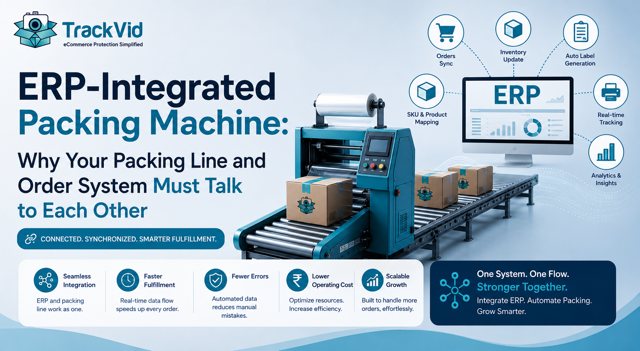
A packing machine that does not talk to your order system solves one problem and creates another. It speeds up packing, then forces your team to type order details or match labels by hand at the station, which is slow and error-prone, and it leaves your systems out of sync. An ERP-integrated packing machine avoids that trap by pulling order data automatically, and integration, not headline speed, is what actually determines whether automation works. This guide explains what an ERP-integrated packing machine does, what breaks without integration, and what good integration looks like.
What ERP Integration Actually Means for a Packing Machine
When a packing machine is integrated with your ERP or order management system, the machine and your order data work as one flow instead of two disconnected steps.
In practice: the order is scanned at the machine, the machine queries your ERP or OMS for that order's details, the correct shipping label for that Order ID is printed and applied, and the order status can be updated automatically once it is packed and dispatched. No one types the order into a second system. No one matches a label from a stack. The order data drives the machine, and the machine reports back to the order data.
That two-way connection is the whole point. The machine is not a standalone device doing its own thing next to your systems. It is an extension of your order system, acting on the same single source of truth every other part of your operation uses.
Why a Non-Integrated Machine Is a Trap
A machine that packs fast but does not connect to your order system looks like automation and behaves like a bottleneck in disguise.
It forces manual data entry. If the machine does not pull order details, someone has to enter them or match labels by hand at the station. That is slow, and it reintroduces the exact human errors, wrong label, wrong order, that automation was supposed to remove. You have automated the mechanical part and left the error-prone part in place.
It creates two sources of truth. When the machine and your ERP do not sync, your order data and your packing reality drift apart. Statuses are not updated automatically, so you get overselling, missed dispatch confirmations, and reconciliation work at the end of every day to reconcile what was actually packed against what your system thinks.
It loses traceability. Without integration, there is no clean, automatic link between a packed parcel and its order record, which makes it harder to trace problems, confirm dispatch, and support disputes.
So a non-integrated machine can leave you faster at packing but slower overall, because the data problems it creates cost more time than the packing speed saves.
Related: What ecommerce packing automation is and how the full line works
What Breaks Without Integration, Concretely
For the technical buyer, here is what non-integration actually costs.
Manual entry errors at the station, which drive misdeliveries and returns. Order statuses that do not update, which cause overselling and inventory drift. Dispatch confirmations that are missed or delayed, which create SLA and account-health problems on marketplaces. And a daily reconciliation burden, because someone has to match the machine's output against the order system by hand. Each of these is a recurring operational cost that a spec sheet focused on packing speed will never show you.
The pattern is consistent: the machine's speed is visible and easy to evaluate, while the integration gaps are invisible until the machine is installed and the data problems start.
What Good Integration Looks Like
Strong integration has a few clear characteristics.
The scan drives everything. Scanning the order triggers an automatic lookup in your ERP or OMS, with no manual entry. The correct label prints and applies from that lookup. The order status updates automatically once packed and dispatched, so your systems stay in sync in real time. And it connects to the order management or ERP systems you already run, rather than forcing you to rebuild your stack around the machine.
When you evaluate a machine, the integration questions matter more than the speed questions. Does it connect to my ERP or OMS? Does scanning pull the order automatically? Does it update status back to my system? If a vendor cannot answer these clearly, the machine will likely become an island, and you will pay for that in manual work and data drift.
Related: A full buyer's guide to choosing an automatic packing machine
A Gurugram Operations Manager Who Nearly Bought the Island
Vivek manages operations for a multi-brand apparel business in Gurugram, shipping around 500 orders per day across marketplaces and a D2C store.
He was close to approving a packing machine chosen mainly on throughput. Late in the evaluation, he asked the integration question that the spec sheet had not answered: would the machine pull order data from their order management system, or would his team enter it at the station? The answer was that it would not integrate, and his team would match and enter orders manually.
He modelled what that meant at 500 orders a day. Manual entry at the station would reintroduce the labelling errors they had been trying to eliminate, statuses would not update automatically so overselling risk would rise, and his team would spend time every day reconciling the machine's output against the order system. The fast machine would have created a slower operation.
"The machine was quick, and that is exactly what almost sold me. The question that mattered was whether it talked to our order system, and it did not. A packing machine that does not connect to your ERP is not automation, it is a fast island that your team has to keep syncing by hand."
Vivek's near-miss is the technical buyer's version of the common mistake. Speed is the easy thing to compare, so it dominates the evaluation, while integration, the thing that actually determines whether the machine helps or hurts, gets asked about last, if at all.
How the TrackVid Machine Integrates
TrackVid's automatic packing machine is built to work as an extension of your order system, not as a standalone device. It connects to your ERP or order management system, so scanning an order pulls its details automatically, prints and applies the correct label for that Order ID, and keeps the packing step tied to your real order data. No manual entry at the station, no second source of truth to reconcile.
Because the order drives the machine, the errors that come from manual matching and entry are removed, and your systems stay in sync. And on the integrated version, the same scanned order that the ERP lookup drives also links the dispatch video to the Order ID automatically, so your proof is tied to the same order record as everything else. TrackVid's platform is already used by 1,100+ Indian ecommerce sellers, who report claim win rates of 90 percent or above on disputes where packing video is submitted, according to TrackVid data.
The machine is pre-launch in India, with early access open to a limited first production batch.
Related: Join the early access waitlist for the TrackVid packing machine
Before You Approve a Machine
If you are the person signing off, make integration a hard requirement, not a nice-to-have. Confirm the machine connects to your ERP or OMS, that scanning pulls the order automatically, and that status updates back to your system. Model what manual entry at your volume would cost in errors and reconciliation before you weigh throughput, because a fast machine that does not integrate usually costs more in data work than it saves in packing time.
Related: How automatic label printing removes the wrong-label error
Join the early access waitlist for the TrackVid automatic packing machine
Takes 30 seconds. No spam. We only contact you about early access and demos.
Related: How automated order packing cuts dispatch time
Frequently Asked Questions
How do I connect a packing machine to my order system? Through integration with your ERP or order management system. A properly integrated packing machine queries your order system when the order is scanned, pulls that order's details, prints and applies the correct label, and updates the status automatically once packed. The connection is usually via an integration or API to your OMS or ERP. Without it, your team enters data or matches labels by hand, which is the part that causes errors, so integration is the feature that makes the machine actually useful.
What is an ERP-integrated packing machine? It is a packing machine that works as an extension of your order system rather than as a standalone device. When an order is scanned, the machine looks it up in your ERP or OMS, prints and applies the right label for that Order ID, and can update the order status automatically. This keeps your systems in sync and removes manual entry at the packing station. A non-integrated machine packs fast but leaves the data work and the errors in place.
Packing machine ERP integration kaise hota hai? Integration ka matlab hai ki packing machine aapke ERP ya order management system se judi hoti hai. Jab order scan hota hai, machine us order ki details aapke system se pull karti hai, sahi label print aur apply karti hai, aur pack hone ke baad status automatically update kar deti hai. Isse manual data entry nahi karni padti aur systems sync mein rehte hain. Bina integration ke, team ko manually data enter karna padta hai, jo errors ki wajah banta hai, isliye integration hi machine ko actually useful banata hai.
What happens if a packing machine is not integrated with my ERP? Three things break. Your team enters order data or matches labels by hand, which reintroduces wrong-label errors. Order statuses do not update automatically, which causes overselling and inventory drift. And you get a daily reconciliation burden, matching the machine's output against your order system by hand. The result is often a faster packing step inside a slower overall operation, because the data problems cost more time than the packing speed saves.
Does a packing machine sync with order management systems? A well-designed one does. Integration with your OMS or ERP is what lets the machine pull order details on scan and push status back once packed, keeping a single source of truth. Not every machine offers this, so it must be confirmed before buying. A machine that does not sync becomes an island your team has to keep aligned manually, which undermines the point of automating in the first place.
Should integration or speed matter more when choosing a packing machine? Integration, in most cases. Speed is easy to compare and dominates evaluations, but a fast machine that does not connect to your order system forces manual entry, causes status drift, and creates reconciliation work, which usually costs more than the speed saves. A slightly slower machine that integrates cleanly will almost always deliver a better real-world result than a faster one that stands alone. Weight the integration questions first.
Sources: TrackVid seller data on claim win rates; general ERP, OMS, and WMS integration best practices for ecommerce operations; marketplace dispatch and account-health requirements from seller portals.
TrackVid is a video proof and claim management platform used by 1,100+ Indian ecommerce sellers on Amazon, Flipkart, AJIO, Myntra and Meesho. Officially authorised by Snapdeal. Learn more at trackvid.in.

Get the Marketplace Claim Recovery Checklist
A 12-point checklist used by 1,100+ sellers to recover 85-90% of marketplace claim losses. Free, instant access.
- Marketplace-specific evidence formats (AJIO, Flipkart, Amazon, Myntra)
- Claim window deadlines for every major platform
- The 6-step process that pushes approval from 85-90%
- Common rejection reasons and how to avoid them
No spam. Unsubscribe anytime. Used by sellers at Rare Rabbit, HRX, Da Milano + 1,100 more.
Stop Losing Money to Fake Returns
Join 1,100+ sellers who recover lakhs every month with TrackVid